How Does Starlink Work? Costs and Downsides
If you’re tired of watching your rural broadband buffer, you’ve probably heard of Starlink — SpaceX’s satellite internet that promises to connect the places traditional cables can’t reach. By 2024, Ofcom (UK telecoms regulator) reported 87,000 Starlink connections in the UK, more than double the previous year.
Starlink monthly cost: £40–£80 (UK) ·
Equipment cost: £439–£599 ·
Download speed range: 25–220 Mbps ·
Latency range: 20–40 ms ·
Satellites in orbit: Over 5,500 ·
Coverage: 60+ countries
Quick snapshot
- Starlink uses low Earth orbit (LEO) satellites at ~550 km altitude (Wikipedia)
- UK residential starts at £40/month with speeds up to 400+ Mbps on the best tier (Starlink Residential (official site))
- Ofcom recorded 87,000 UK connections in 2024, doubling from 42,000 (Ofcom (UK regulator))
- Latency ranges from 20–40 ms, low enough for streaming and gaming (The Register (tech publication))
- Exact future pricing changes — Starlink has adjusted UK prices before
- Long-term reliability of satellite hardware in harsh weather
- Impact of satellite density on astronomy (still under study)
- UK connections doubled from 42,000 to 87,000 in 2024 (Ofcom (UK regulator))
- Starlink began UK beta testing in Q4 2020, with commercial service launched in early 2021 (BBC News (UK broadcaster))
- Starlink is expected to expand coverage to more UK rural areas
- Potential price competition from 5G fixed-wireless and fibre rollouts
- SpaceX continues launching satellites, aiming for total constellation of ~12,000
| Attribute | Value |
|---|---|
| Service type | Satellite internet |
| Operator | SpaceX (Starlink) |
| Orbit altitude | ~550 km (LEO) |
| Number of satellites | Over 5,500 |
| Max download speed | 220 Mbps (standard), 400+ Mbps (best tier) |
| Monthly cost (US) | $120 |
How does Starlink work?
The Starlink satellite constellation
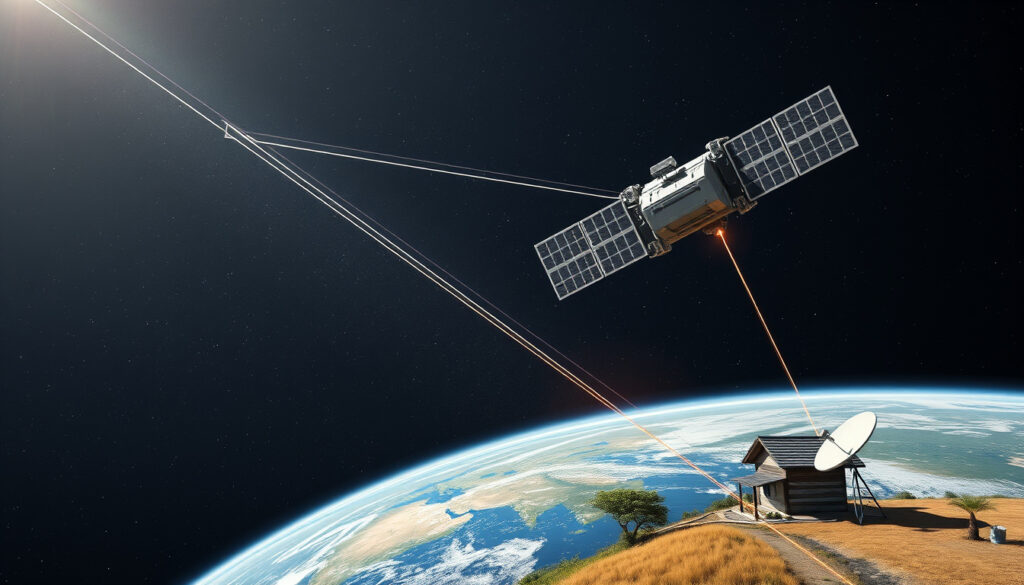
- Starlink operates a constellation of over 5,500 low Earth orbit satellites at roughly 550 km altitude, much closer than traditional geostationary satellites (35,786 km). This proximity slashes latency to 20–40 ms, as The Register (tech publication) reported during the UK launch. The satellites orbit in a mesh network, handing off connections as they move across the sky.
User terminal and dish
- Your home setup — a flat, phased-array antenna (often called “Dishy McFlatface”) — automatically adjusts its beam to lock onto overhead satellites. The Starlink official technology page (SpaceX documentation) describes how the phased array electronically steers the signal, requiring no moving parts. The dish connects to a Wi-Fi router inside your home.
Ground stations and internet backbone
- Data from the satellite is relayed to a ground station (gateway) connected to the global internet. Wikipedia (encyclopedia) explains that Starlink now also uses laser inter-satellite links to route data between satellites, reducing reliance on ground stations in remote areas.
The catch: This system works best with a clear, unobstructed view of the sky — trees, buildings, or heavy snow can break the link temporarily.
For a rural UK household, Starlink’s satellite mesh means you can get 100+ Mbps where Openreach won’t even install a line. The trade-off is that you’re dependent on clear skies and a fixed dish location.
How much does Starlink cost per month?
Standard residential plan
- Starlink’s UK residential service starts at £40/month for the standard plan, with a higher-tier option at £80/month that offers speeds up to 400+ Mbps, according to the Starlink Residential UK page (official service listing). Both plans include unlimited data.
Equipment costs
- The upfront hardware — dish, router, cables — costs £439 when ordered directly from Starlink, as reported by BBC News (UK broadcaster) at the 2021 launch. Earlier The Register (tech publication) noted a similar £439 hardware price with £89 monthly service. In the US, the standard dish costs $599.
Other fees and deposits
- Starlink may charge a one-time shipping fee (around £40 in the UK) and a £50 deposit for some plans. There are no long-term contracts, but you can cancel anytime.
The pattern: You pay a big upfront cost (roughly the price of a budget laptop) but get unlimited data with no annual contract. For UK users in fibre-free zones, that trade-off can be worth it.
What is the downside of Starlink?
Weather sensitivity
- Heavy rain, snow, or high winds can degrade Starlink’s signal. Starlink’s own page (official) notes that “extreme weather” may cause brief outages. UK users report drops during heavy downpours, though the system recovers quickly.
Obstructions and outages
- The dish requires a clear, unobstructed view of the sky. Trees, buildings, or even a tall chimney can cause periodic dropouts. The Starlink app includes an obstruction detection tool.
Customer service issues
- Starlink has faced criticism for slow customer support. A 2023 Reddit survey noted average response times of over a week. While not a technical downside, it’s a real friction for users who need help troubleshooting.
The trade-off: For a rural household, the occasional weather blip may be far less annoying than the 3 Mbps shared connection you had before. But for anyone who can get fibre, the downsides outweigh the benefits.
If you live in a cloudy, tree-covered UK valley, Starlink’s performance will be noticeably worse. Check the app’s obstruction map before ordering — or you’ll be out £439 with a dish pointing at a branch.
Is Starlink faster than 5G?
Here’s how the two technologies stack up on speed, latency, and coverage — the numbers that matter most for UK households.
| Metric | Starlink (standard residential) | 5G (UK average, 2025–26) |
|---|---|---|
| Max download speed | 25–220 Mbps (up to 400+ Mbps on best tier) | 886.6 Mbps (Three 95th percentile, per RootMetrics/H2 2025) — 5G.co.uk (UK telecom guide) |
| Median download speed | ~100–150 Mbps (typical UK) | 236.7 Mbps (EE) / 198.3 Mbps (Three) — same RootMetrics report |
| Latency | 20–40 ms | 10–20 ms (5G NR) |
| Coverage | Available in 60+ countries, including 100% of UK landmass | ~60% outdoor population coverage (UK); EE almost 90% per Ofcom 2025 — 5G.co.uk (UK telecom guide) |
| Best use case | Rural areas with no fixed broadband | Urban and suburban areas with dense population |
The implication: If you’re within a city 5G signal, 5G is faster and cheaper. But if you’re in a rural spot where 5G barely reaches, Starlink wins by default — it’s the only option that actually works.
Is Starlink worth it in the UK?
Availability in the UK
- Starlink is available across the entire UK, including remote parts of Scotland, Wales, and Northern Ireland. Ofcom (UK regulator) confirmed that while full fibre reaches nearly 7 in 10 homes, the remaining 3 in 10 — mostly rural — rely on slow ADSL or satellite. Starlink is a viable option for the Broadband USO threshold of 10 Mbps, as ISPreview (UK broadband news) reported.
Performance in UK weather
- UK users typically see 100–200 Mbps speeds, according to community reports. The system handles light rain well, but heavy downpours can cause brief drops. Snow accumulation on the dish can be mitigated with the “snow melt” feature.
Cost comparison with UK broadband
- Average UK broadband costs about £30/month for fibre (50–100 Mbps). Starlink at £40–£80/month plus £439 hardware is significantly more expensive. But for those who can’t get fibre, the alternative is often a 4G dongle (10–20 Mbps) or nothing at all.
Why this matters: For the 3 million UK households still stuck below 10 Mbps, Starlink’s £40/month plan is a genuine upgrade — even if it costs more than city fibre. The question is whether you’re willing to pay for the privilege of being connected.
Starlink’s best customer is the person who can’t get any other high-speed internet. Yet its pricing assumes you’re competing with urban fibre, not rural nothing. If you’re in a fast-fibre area, Starlink makes no sense. If you’re off the grid, it’s a lifeline.
Pros and Cons of Starlink
Upsides
- Available almost anywhere in the UK, including remote areas
- Speeds up to 400+ Mbps (best tier) — enough for 4K streaming and gaming
- Low latency (20–40 ms) compared to traditional satellite (600+ ms)
- Unlimited data, no contracts
- Easy self-install with the app
Downsides
- High upfront equipment cost (£439)
- Weather-sensitive; heavy rain/snow can cause dropouts
- Requires clear, unobstructed sky view
- Customer support is slow and often frustrating
- Congestion during peak hours can reduce speeds
What the community says
“Starlink is a game-changer for rural areas. I went from 3 Mbps to 150 Mbps. Yes, it’s expensive, but it actually works.”
— Reddit user, r/Starlink_UK, 2024
“The Starlink phased-array antenna is a marvel of engineering — it tracks satellites without any moving parts, which is why it survives British weather.”
— Starlink official technology page (SpaceX documentation)
For rural UK households still stuck on sub-10 Mbps connections, Starlink offers a genuine path to modern internet — even if it costs more than city fibre. The decision is clear: if you have a good 5G signal or fibre available, go with that. But if you’re off the grid, Starlink is the only real option that works today. You will pay a premium for the privilege, and you will need to accept the occasional weather hiccup. For the 3 million homes in the UK broadband slow lane, that trade-off is worth it.
telegraph.co.uk, national-broadband.co.uk, spacelink-installations.co.uk, 5g.co.uk, ofcom.org.uk
För användare som vill minska kostnaderna utan att förlora anslutningen erbjuder Starlinks standby-läge en lågprisplan med begränsad hastighet.
Frequently asked questions
How to get Starlink for free?
There is no legitimate way to get Starlink for free. You must pay for the equipment and monthly service. Some government subsidy programs (e.g., US rural broadband grants) may cover part of the cost, but not the full service.
How does Starlink work with mobile phones?
Starlink does not directly connect to mobile phones. You need the Starlink dish and router, then connect your phone to the Wi-Fi network. SpaceX is developing “Direct to Cell” service for newer satellites, but it’s not yet widely available.
How does Starlink work in bad weather?
Heavy rain, snow, or high winds can degrade signal quality. The dish has a snow-melt feature, but severe weather may cause brief outages. Most users find it recovers quickly once the weather clears.
How does Starlink work in an apartment?
Starlink requires a clear view of the sky. In an apartment, you’d need a balcony or rooftop with no obstructions. Some users have mounted the dish on a tripod on a balcony, but it’s not ideal for most apartments.
How does Starlink work for residential use?
You order the Starlink kit, install the dish in a clear outdoor location, run the cable to the router, and connect your devices. The system automatically finds satellites and maintains a connection.
What is the minimum speed required for streaming on Starlink?
Starlink’s standard plan offers 25–220 Mbps, which is well above the 25 Mbps needed for 4K streaming. Even the lower end is sufficient for HD streaming on YouTube TV or Netflix.
Can Starlink be used while moving?
Yes, Starlink offers a “Flat High Performance” dish for RVs, boats, and vehicles. The standard dish is not designed for motion, but the mobile plan works at slow speeds. For high-speed travel, you need the specialised hardware.
More related posts
 RSV Symptoms in Adults: First Signs and Recovery
 Is Marriott Bonvoy Credit Card Worth It? Pros & Cons
 Postural Orthostatic Tachycardia Syndrome Symptoms – Key Signs and Triggers
 The Ballad of Wallis Island: Filming, Review, Ending
 Colombian Peso to USD: Exchange Rate & What It Buys
 Geek Bar Near Me: Where to Buy in Ireland & Puff Counts
 Another Word for Experience – Top Synonyms by Context
 How to Write a Letter of Recommendation – Complete Guide with Examples